Virtual Try-On for Fashion E-commerce: How AI Fitting Rooms Work
byDresium
••7 min read
Buying clothes online still involves a lot of guesswork about size. Shoppers compare photos, read reviews, order two sizes “just in case,” and send back the one that doesn’t fit. For fashion brands, that means costly returns, thinner margins, and a shopping experience that rarely feels premium.
Virtual try-on (also called an AI fitting room) is built to fix this. Instead of imagining how a garment will look, shoppers see it on themselves, right on the product page. This guide covers what virtual try-on is, which technologies exist, what results to expect, and how to add it to a Shopify, WooCommerce, or custom store.
What is virtual try-on?
Virtual try-on is a technology that lets people try on clothing, accessories, or other products virtually, seeing how they look on their own body before buying. In fashion e-commerce, the shopper starts from a photo or their phone camera and gets a realistic image of themselves wearing the item.
It isn’t a cosmetic filter. The goal is to remove doubts about fit and look, so shoppers decide faster and with more confidence, without leaving the site.
Why virtual fitting rooms matter for fashion brands
Apparel has some of the highest return rates in e-commerce, often above 40% of orders. Three causes come up again and again:
Fit uncertainty. Photos and lookbooks help, but they can’t replace trying something on.
Expensive returns. Every returned item costs money in shipping, warehousing, and customer support.
Friction at checkout. When a doubt goes unanswered, the cart gets abandoned.
A well-integrated virtual fitting room steps in exactly where the doubt arises: the product page.
Types of virtual try-on technology
Not all virtual try-on systems work the same way. There are three main approaches:
Real-time augmented reality (AR). Overlays the product on a live camera feed. It works very well for glasses, makeup, watches, and shoes, but less so for clothing, where fabric has to follow the body’s shape and movement.
3D avatars. Shoppers enter their measurements and see the garment on a digital mannequin. Useful for sizing, but less immediate and less personal, and every product needs a 3D model.
Generative AI from photos. Starting from a selfie and standard product images, an AI model generates a realistic image of the shopper wearing the item. For fashion, it’s currently the most practical option: no 3D catalog required, and the output looks like a real photo.
Dresium belongs to this third category.
How AI virtual try-on works
To drive sales, the try-on has to be fast and stay inside the store. A typical flow, such as Dresium’s, has three steps:
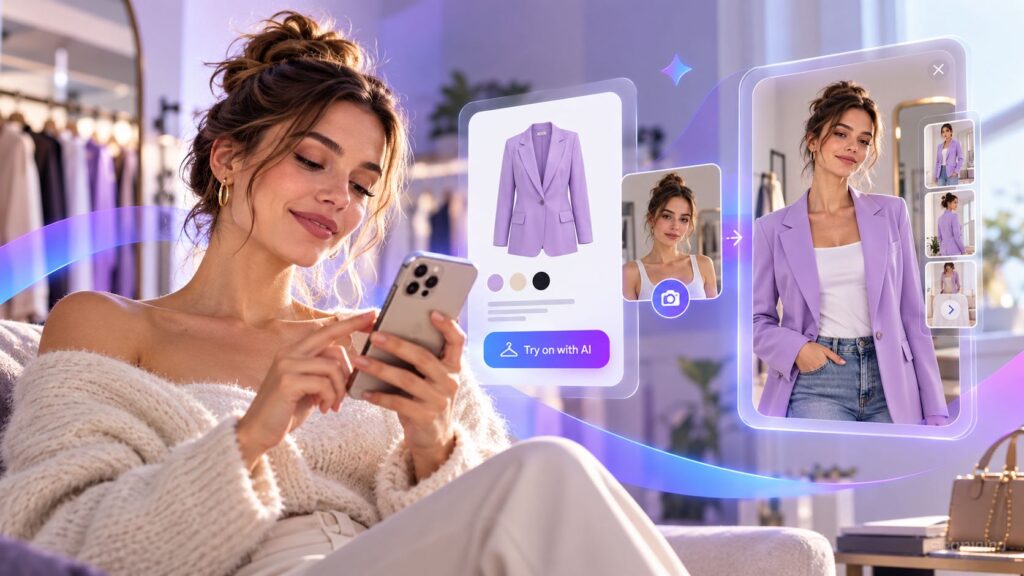
A try-on button on the product page. It’s built into the page design rather than added as a third-party widget, and it prompts shoppers to try the item at the moment they’re considering it.
A selfie in two clicks, with no app to download. The AI engine processes body proportions and lighting. On mobile, every extra step loses users, so having nothing to install matters.
A realistic result. Shoppers see themselves wearing the garment, judge the fit and look, and can buy right away.
Beyond a static photo: video, backgrounds, and wardrobes
A modern virtual fitting room can offer more than a single image:
Video try-on. A short virtual catwalk shows how fabric moves and drapes. It’s especially useful for dresses, outerwear, and any item where drape matters as much as color.
Background swap. Shoppers replace their bedroom with a setting where they’d actually wear the item, such as a city street or an event.
Personal wardrobe. Try-ons are saved to a gallery, where shoppers can compare outfits side by side and share looks to ask friends for their opinion.
The product page becomes a small styling experience: shoppers stay longer and remember the brand.
What results to expect: returns, conversions, loyalty
The benefits of virtual try-on show up in three areas:
Fewer returns. When shoppers can see how an item fits their body, fewer orders come back for the wrong size or fit. Dresium’s stated target is a reduction of up to 30%.
More conversions. Trying on speeds up the decision and reduces cart abandonment. Dresium indicates a potential conversion rate increase of up to 45%.
Stronger loyalty. A personalized, innovative shopping experience is memorable and brings people back.
Results depend on your catalog, your audience, and the quality of the integration, which is why measuring them in your own store is essential (more on that below).
How to choose a virtual try-on solution
Before adopting a virtual fitting room, assess six factors:
Realism. Test it with your own garments and on a range of body types.
Shopper friction. Does it require external apps, sign-ups, or measurements? Fewer steps is better.
Brand consistency. The plugin should feel like part of your site, with no watermarks or off-brand UI.
Performance impact. It shouldn’t slow down the product page or hurt Core Web Vitals.
Privacy. You’re asking customers for a photo: where is it processed, how long is it kept, and how is it protected?
Measurement and cost. You need clear metrics and pricing tied to actual usage.
Dresium: virtual try-on for fashion brands
Dresium is a generative AI fitting room designed to integrate natively into fashion e-commerce stores. Here’s how it meets the criteria above.
Shopify, WooCommerce, and custom integrations
Shopify. Official app from the Shopify App Store, no-code setup, adapts automatically to your theme.
WooCommerce. Native WordPress plugin, enabled on product pages in the categories you choose.
Magento, PrestaShop, and custom CMS. Custom integration, with technical documentation available on request.
On Shopify and WooCommerce, setup takes a few minutes.
Brand customization with Style Inspector
Style Inspector lets you adjust the primary color, corner style (sharp, rounded, pill), and typography (sans, serif, mono) in real time, so the plugin matches your visual identity and looks like an in-house build.
Performance and privacy
Speed. Processing runs asynchronously on dedicated servers, so your product pages stay fast.
Data protection. Images are encrypted in transit and at rest and handled in compliance with GDPR
A dashboard to measure ROI
The analytics dashboard ties virtual try-on to your e-commerce KPIs:
Engagement. How many unique users start a try-on.
Conversion. Conversion rate for try-on users vs. non-users.
Returns avoided. Estimated logistics savings.
Most-tried items. Which products attract the most interest.
Pricing: pay as you go, no subscription
Free installation.
No monthly fee: you pay only when a shopper generates a try-on.
No watermark.
Dashboard, plugin, and updates included.
Buy credits and top up as needed, so costs grow with actual usage rather than a fixed fee.
Mistakes to avoid when launching a virtual fitting room
Treating it as a gadget. Without goals and KPIs, you can’t prove ROI.
A poorly integrated experience. External apps, watermarks, and off-brand design add friction.
Ignoring performance. A script that slows the product page costs sales even from shoppers who never use the try-on.
Overpromising. Tell shoppers what the try-on actually shows, and let the data you collect over time speak for itself.
Try virtual try-on in your store
If you run a fashion brand on Shopify, WooCommerce, or a custom platform, you can enable Dresium’s virtual fitting room on your product pages and track the results in the dashboard.
What is virtual try-on? It’s a technology that lets shoppers try on clothing and accessories virtually, seeing how they look on their own body before buying. In fashion e-commerce, it’s built directly into the product page.
What’s the difference between AR and generative AI virtual try-on? AR overlays the product on a live camera feed and works best for glasses, makeup, and shoes. Generative AI creates a realistic image of the shopper wearing the garment from a selfie, which suits clothing better.
Does virtual try-on really reduce returns? It mainly reduces returns caused by fit or look not matching expectations. The impact depends on your catalog and audience, so it should be measured in your own store.
How does Dresium integrate with Shopify or WooCommerce? On Shopify through the official app, with no code. On WooCommerce through a native WordPress plugin. Custom integrations are available for Magento, PrestaShop, and proprietary CMS.
Will virtual try-on slow down my site? No. Dresium processes try-ons asynchronously on dedicated servers, so product pages aren’t weighed down.
How much does it cost? Dresium is pay as you go: free installation, no monthly fee, and you pay only for the try-ons shoppers generate.
Are customer photos safe? Yes. Images are encrypted and handled in compliance with GDPR.
 byDresium